

Remind suppliers before their documents run out
Have the system email your suppliers when their insurance or licence is about to run out, so the renewed certificate arrives before anything is stopped. It is off until your company switches it on.
Before you start
Section titled “Before you start”- Who can do this: anyone with Manage prequalification and compliance documents. Administrators always can. Others can see whether reminders are on and what was sent.
- The supplier needs an email address in Suppliers. Without one they are skipped.
- At least one document is set up on the Documents tab.
-
Open Compliance, then the Documents tab. The reminders card is under the list of documents.
-
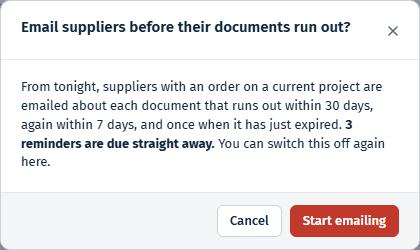
Switch on Email suppliers before their documents run out. A window asks first and says how many reminders are due straight away.
-
Choose Start emailing. The card now says how many reminders are due, and how many cannot go because the supplier has no email address. Due reminders go tonight.
-
To send them now instead of tonight, choose Send due reminders now and confirm. A line says how many were sent, and why any were not.
What happens next
Section titled “What happens next”- Each night, a supplier with an order on one of your current projects is emailed about each document that has a date recorded: once when it runs out within 30 days, again within 7 days, and once when it has just expired.
- The email comes from the system in your company’s name, names the document (with the insurer and policy number when recorded) and the date, and asks the supplier to reply with the renewed certificate. Replies go to your company’s contact email when one is set.
- The card lists the most recent reminders: when, whether it was Nightly or Sent now, the supplier, the document, the day it runs out, which reminder it was, and the address it went to.
Good to know
Section titled “Good to know”- The same reminder is never sent twice for the same document and date. Recording a new date starts the three reminders again.
- A document that ran out more than two weeks ago is not reminded about, so switching this on does not email everyone about old certificates.
- A document marked Not required for a supplier is never reminded about.
- Reminders go for every document with a date, not only the ones that stop orders or payment.
- The email has no link. The supplier replies, or sends the certificate through the subcontractor portal.
- Switching it off does not ask, and nothing more is sent.