

Record an induction
The Inductions tab is one list of who has been inducted on the project: the site induction people sign on the site register, and the inductions your company gives in person, such as its own staff induction or one for the hoist. Record each one given in person here, with the day it runs out.
Before you start
Section titled “Before you start”- Who can do this: anyone with “See and record inductions” on the project. Nobody has it until an administrator ticks it on the Users page or in a project role; administrators always can.
- The kind of induction exists under Induction types. See Set up your induction types.
-
Open Safety, choose the project on the left, then the Inductions tab.
-
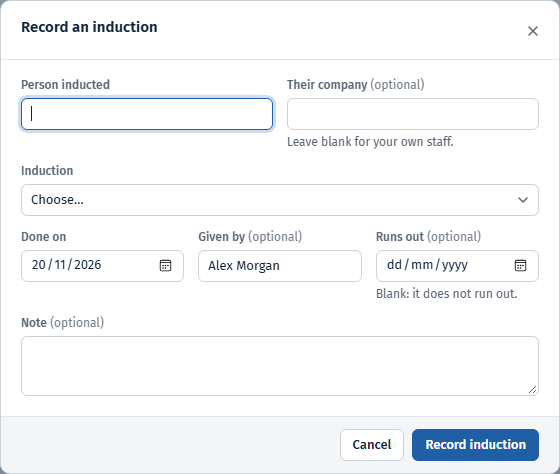
Press Record an induction. The window Record an induction opens.
-
Person inducted: their name.
-
Their company: who they work for. Leave it blank for your own staff.
-
Induction: choose which one it was. The line under it says what it covers.
-
Done on: the day it was given. A day in the future is refused.
-
Given by: who gave it. It starts with your name.
-
Runs out: filled in from the induction type’s months. Change it if needed, or leave it blank if it does not run out.
-
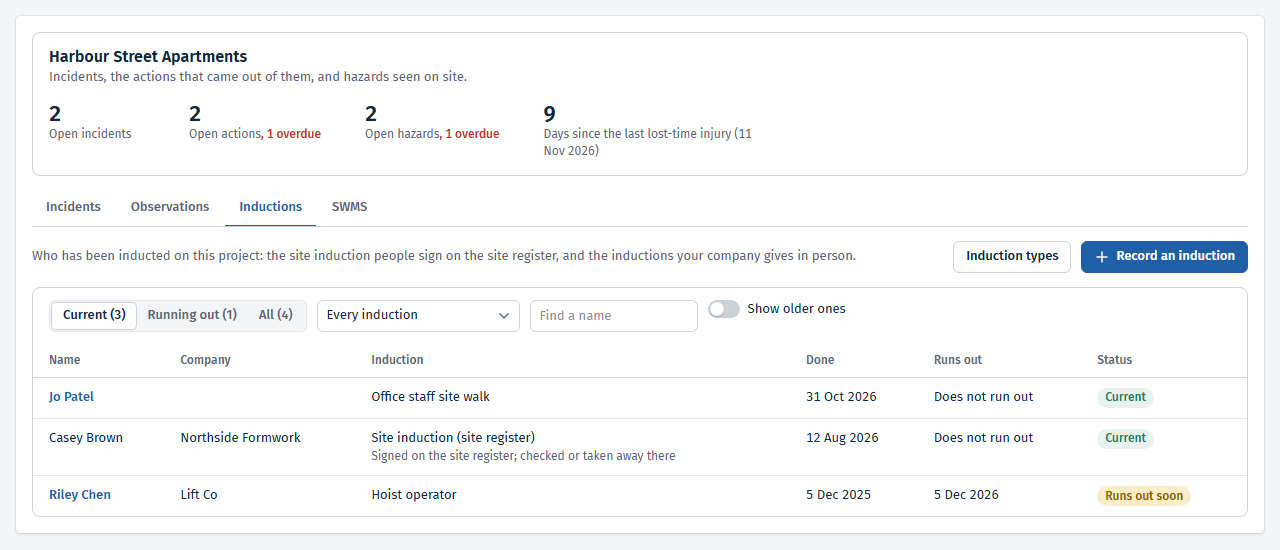
Add a Note if you want to, and press Record induction. The person is listed with the induction, the day it was done, when it runs out and its status.
What happens next
Section titled “What happens next”The status is worked out for you: Current, Runs out soon (within 30 days), Run out, or Taken away for a site induction the site manager took away on the site register.
Good to know
Section titled “Good to know”- To induct someone again, record a new induction. The list shows each person’s newest of each kind; switch on Show older ones to see the earlier ones.
- Show has Current, Running out and All. Narrow the list by induction, or type part of a name in Find a name.
- Site induction (site register) rows are read only. They are checked and taken away on the site register, where the worker signed it.
- Click a recorded induction to change it, or to Delete it.
- People are typed by name, as for the people involved in an incident: most are subcontractors’ workers who do not log in.
- Nothing sends a reminder before an induction runs out. Look at Running out.
- A person on the project with a read-only role sees the list but cannot record.