

Release retention
Retention held from a subcontractor is paid back in two parts: a share at practical completion, and the rest when the defects period ends. Each release makes its own supplier invoice.
Before you start
Section titled “Before you start”- You need the “Release retention” permission. Nobody but an administrator has it until it is ticked under Users.
- For the release at practical completion, the subcontract is Complete. For the final release, its defects period has ended.
-
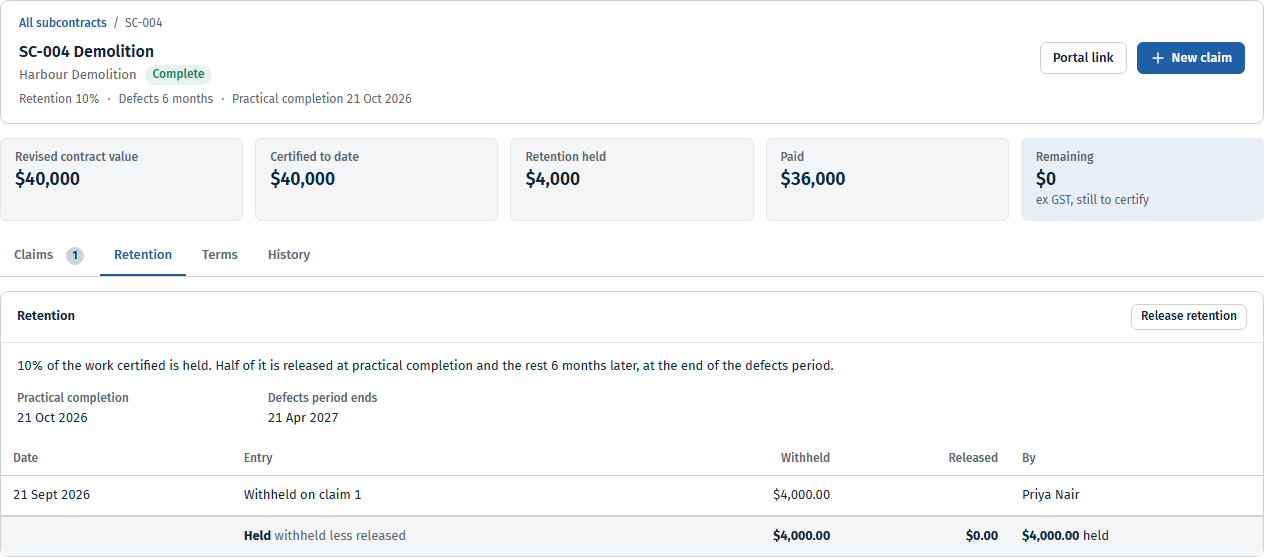
Open the subcontract and the Retention tab. It shows the ledger: each amount withheld and released.
-
Choose Release retention.
-
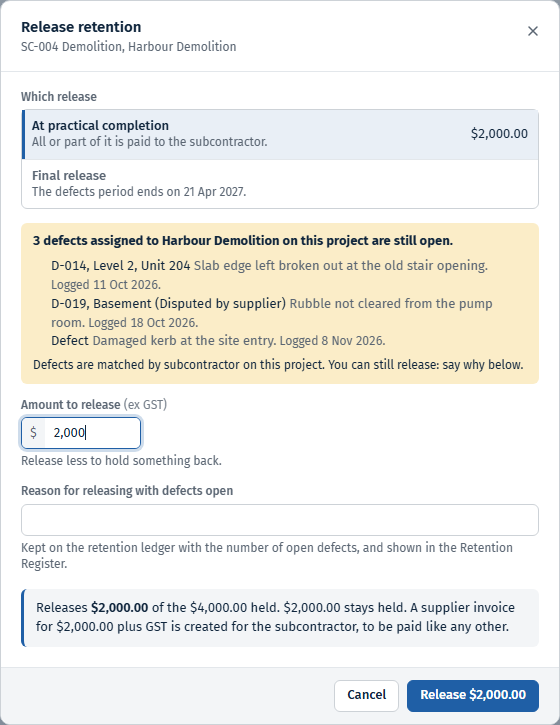
Under Which release, choose At practical completion or Final release. Each says how much can be released now, or why it cannot be yet.
-
Check Amount to release. It starts at the most that can be released; type less to hold something back.
-
If the subcontractor has open defects on the project, they are listed and Reason for releasing with defects open must be filled in. Otherwise a Note is optional.
-
Choose Release; the button names the amount.
What happens next
Section titled “What happens next”- Where a Retention release workflow step applies to the amount, the release waits for approval in My Approvals and counts for nothing until it is approved. Take it back stops it while it waits.
- Once posted, a supplier invoice for the amount is made against the purchase order, dated and due that day, and the ledger and the Retention Register show the release.
Good to know
Section titled “Good to know”- Open defects never stop a release. The ledger keeps how many were open and your reason.
- Defects are matched to the subcontract by supplier on the project, so a supplier with two subcontracts on one project shows the same defects on both.
- A posted release cannot be undone here.
- Retention released before SmarteBuild counts against the share released at practical completion.