

Record a service, inspection or registration
Each time a machine is serviced, inspected, registered or repaired, record it against the item, with the certificate if you have one. Recording the next one due moves the item’s due date, so it stops showing as overdue.
Before you start
Section titled “Before you start”- Who can do this: “Add and change plant and equipment”. The cost is shown and typed only by people with “See hire rates and plant cost”.
-
Open Plant Register on the All plant tab and choose History on the item’s row.
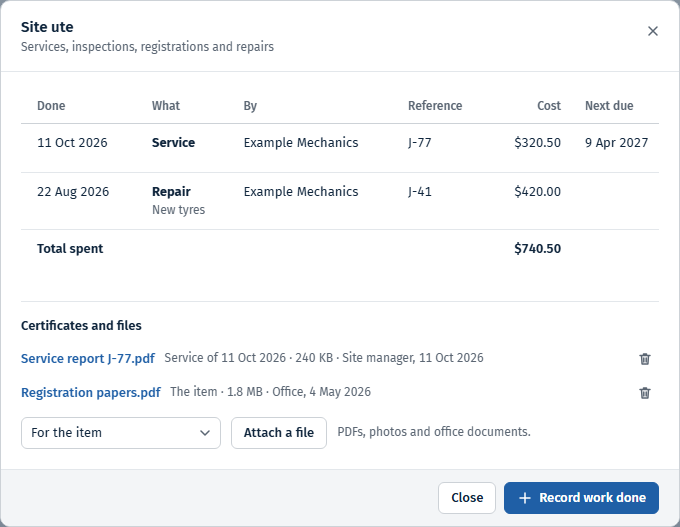
-
Choose Record work done.
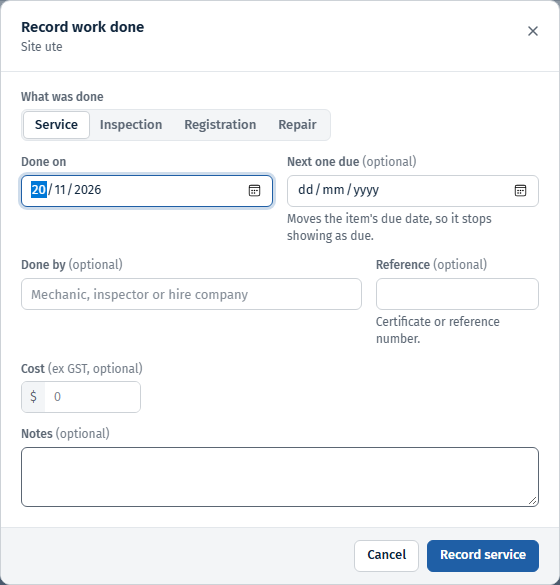
-
Under What was done, choose Service, Inspection, Registration or Repair.
-
Choose the day under Done on.
-
For a service, inspection or registration, choose Next one due.
-
Fill in what applies: Done by (a mechanic, inspector or hire company), Reference (the certificate or job number), Cost ex GST and Notes.
-
Choose Record service (or inspection, registration, repair). It appears in the history.
Attach the certificate
Section titled “Attach the certificate”- In the same window, under Certificates and files, choose what the file is for: For the item, or one of the records, such as the inspection of a given day.
- Choose Attach a file and pick the PDF, photo or document. It is listed with what it is for, its size, who added it and when.
Good to know
Section titled “Good to know”- A repair has no next one due.
- The history shows the total spent on the item, to people who may see costs.
- Removing a file asks first. Deleting a record leaves its files on the item.
- Files download only for people who can open Plant Register, and only for your company’s plant.