

Find the projects at risk
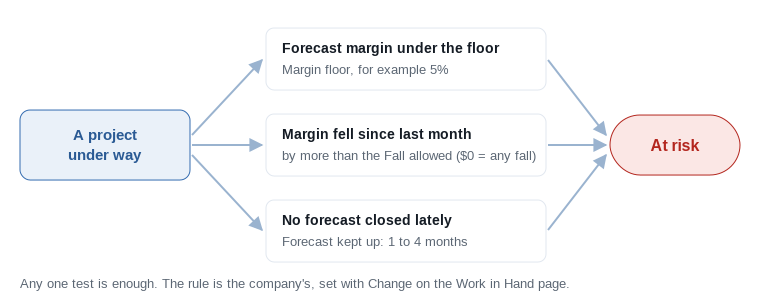
Work in Hand marks a project under way as at risk when its forecast margin is too low, when its margin has fallen, or when nobody has closed a forecast on it for too long. Check the list before a commercial meeting, and ask the project manager about each one.
Before you start
Section titled “Before you start”- Who can do this: See company work in hand. Administrators always can.
-
Open Work in Hand from the menu on the left.
-
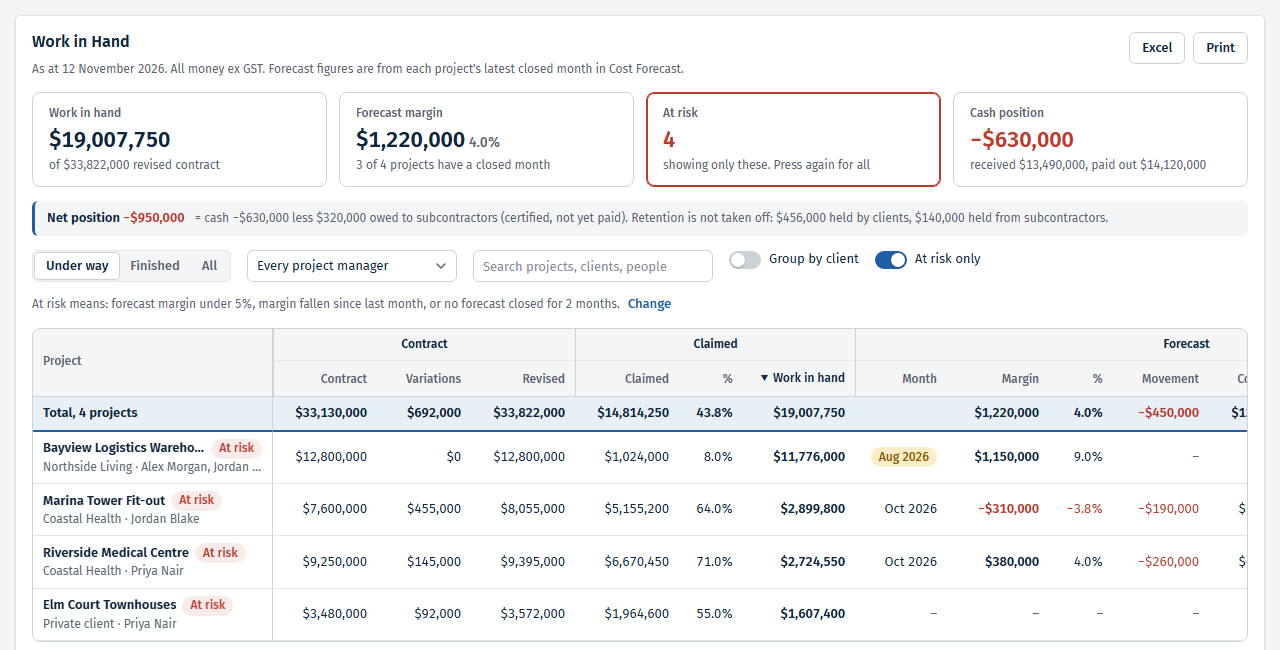
Read the line above the table that starts At risk means: it is the company’s rule, in words.
-
Press the At risk tile, or switch on At risk only. The table lists only the projects at risk, and the tiles add up only those.
-
Hold the pointer over a project’s red At risk mark to see why. On a phone the reason is written on the project’s card.
-
Click the project’s name to open its Cost Forecast and look at the cost codes behind it.
-
Press the At risk tile again to see every project.
Good to know
Section titled “Good to know”- A project is at risk for any one of three reasons: forecast margin under the floor, margin fallen since the month before, or no forecast closed for the number of months the rule allows.
- A project under way that has never had a month closed in Cost Forecast is at risk until one is.
- Finished projects are never marked at risk.
- Group by client puts the projects under their clients, with a total for each.
- Excel saves the table shown as a file Excel opens; Print prints the tiles and the table on A4 landscape.