

Enter an opening balance
When a project was already under way before it came into SmarteBuild, enter where the contract stood: what had been claimed from the client and the retention the client was holding. The next claim against the schedule of values starts from there, so nothing is claimed twice.
Before you start
Section titled “Before you start”- Who can do this: anyone with Set up the head contract and schedule of values, for the whole company or through their role on the project. Administrators always can.
- On the Head Contract page, Claims to the client are made is set to Against the schedule of values. The opening balance is only offered for such a contract.
- Have the last claim made before SmarteBuild in front of you. Amounts are ex GST.
-
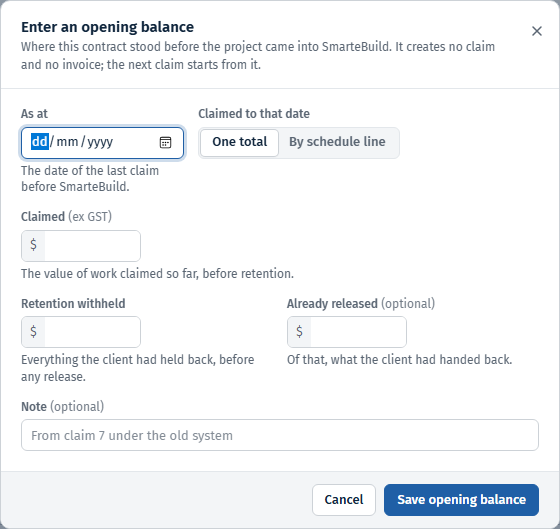
Open Head Contract. On the Contract tab, under the contract, choose Enter an opening balance.
-
Choose the As at date: the date of the last claim before SmarteBuild.
-
Under Claimed to that date, choose One total or By schedule line. By schedule line is offered once the schedule of values has lines.
-
For one total, type what was Claimed: the value of work claimed so far, before retention. For by schedule line, type what was claimed on each line, and leave a line empty where nothing was claimed. The Total claimed adds up as you type.
-
Type the Retention withheld: everything the client had held back, before any release.
-
If the client had already handed some back, type it under Already released.
-
Add a Note if it helps, such as “From claim 7 under the old system”.
-
Read the sentence at the bottom. It says what the next claim starts from, how much retention the client is holding, and how much more can be held before the limit. Then choose Save opening balance.
What happens next
Section titled “What happens next”- The Contract tab shows the opening balance, who entered it and when, and a Retention held by the client list: what was withheld and released, before SmarteBuild and on each claim since, and what the client holds now.
- On a claim’s Schedule tab in Progress Claims, Previously claimed includes the opening balance. A balance entered as one total is in the Total row, not against any line.
Good to know
Section titled “Good to know”- It is not a claim. It creates no claim and no invoice, and nothing is sent to the client.
- It is locked once the first claim against the schedule is approved. Until then, choose Edit to correct it, or Remove in the window to take it off.
- No more can be entered on a line than the line is worth, and a single total cannot be more than the contract sum.
- Retention withheld cannot be more than the amount claimed, and more cannot have been released than was withheld.