

Price daywork into a variation
Signed daywork sheets are claimed by turning them into a variation: a client variation for the client’s sheets, or a variation on the subcontract for a subcontractor’s sheets. Several sheets can go on one variation.
Before you start
Section titled “Before you start”- Who can do this: “Price daywork into variations”, and for a client variation also “Edit variations” and access to the estimate; for a subcontract variation also “Create and edit subcontract variations”.
- The sheets are signed by both sides, and approved where your workflow asks for it.
-
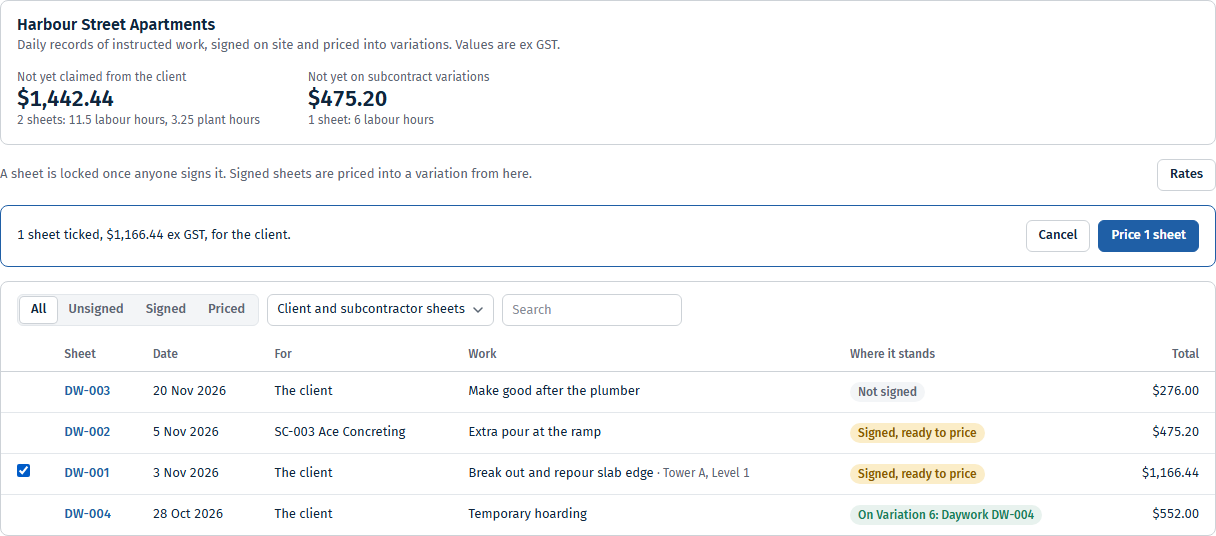
Open Daywork Sheets and choose Price into a variation. Tick boxes appear beside the sheets that can be priced.
-
Tick the sheets. Once you tick one, only sheets that go with it can be ticked: all for the client, or all on the same subcontract. The line above says how many are ticked and their total.
-
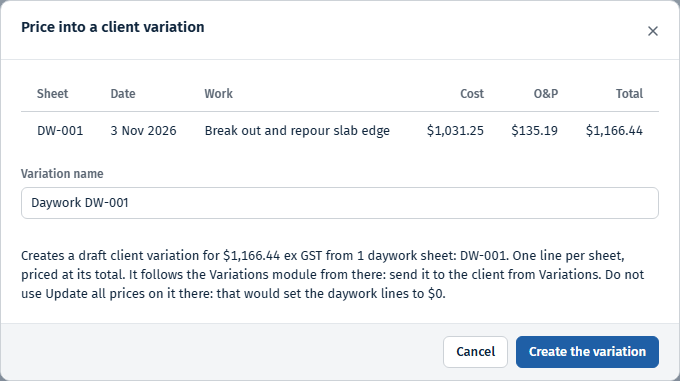
Choose Price with the number of sheets. A window lists each sheet with its cost, its overheads and profit, and its total.
-
For a client variation: check the Variation name (it starts as “Daywork” and the sheet numbers) and, when the project has more than one estimate, choose the Estimate.
-
For a subcontract variation: check the Title, choose the Cost code, and optionally choose under Paid for by the client variation that pays for this work.
-
Read the sentence at the bottom, for example “Creates a client variation for $2,908.05 ex GST from 2 daywork sheets”, and choose Create the variation (or Create the subcontract variation).
-
A line says what was made, with a button to open it.
What happens next
Section titled “What happens next”- A client variation is a draft in Variations, with one line per sheet: the sheet’s cost as the line’s cost, its overheads and profit as the markup, and GST added as the variation adds it. It then follows the Variations module: internal sign-off where you have one, then sent to the client from Variations.
- A subcontract variation is a draft addition on that subcontract, its description listing the sheets. It is sent for approval in Subcontracts like any subcontract variation.
- Each sheet now shows On and the variation’s name, with a link to it.
Good to know
Section titled “Good to know”- In Variations, do not use Update all prices on a variation made from daywork: it would work the daywork lines out again from items they do not have, and set them to $0.
- A sheet can be on one live variation only. If that variation is deleted, the sheet says “its variation was deleted” and can be priced again.
- A sheet on a live variation cannot be reopened.