

Set the daywork rates
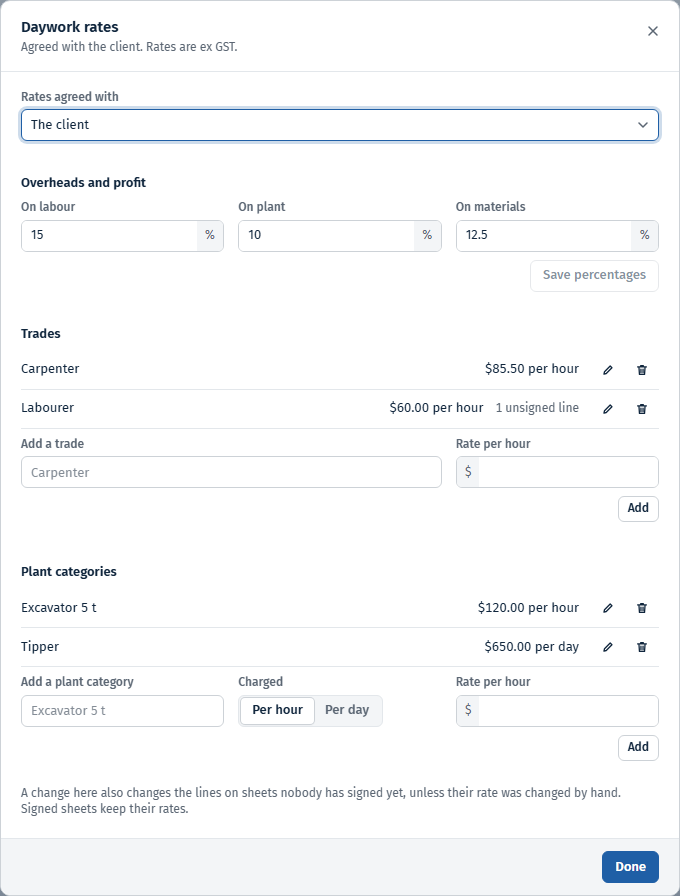
Each project has one set of daywork rates agreed with the client, and each subcontract can have its own set agreed with that subcontractor. Set them before the first sheet, so every line picks up the right rate by itself.
Before you start
Section titled “Before you start”- Who can do this: “Set daywork rates”. Anyone who can open the page can read the rates.
- For a subcontractor’s rates, the subcontract is on the project.
-
Open Daywork Sheets and choose Rates.
-
Under Rates agreed with, choose The client or the subcontract. (The choice appears only when the project has subcontracts.)
-
For a subcontract with no rates yet, choose Copy the client’s rates to start from the client’s, then change what differs.
-
Under Overheads and profit, type the percentage On labour, On plant and On materials, and choose Save percentages.
-
Under Trades, add each trade with its Rate per hour, then Add.
-
Under Plant categories, add each category, choose Per hour or Per day under Charged, type the rate, then Add.
-
Choose Done.
Good to know
Section titled “Good to know”- A changed rate or percentage also changes the lines on sheets nobody has signed yet, unless the rate on that line was changed by hand. Signed sheets keep their rates.
- A trade or category can be removed even when lines use it: those lines keep the rate and the name they were given.
- Names are unique within a set: one Concreter, one 5 t excavator.
- Percentages are between 0 and 100. Rates are ex GST.