

Track progress and take-up
The Reports screen shows how far the finishes have come, level by level, which upgrades and palettes are being taken, and which units need chasing. Use it for the weekly meeting, or print it for the sales team.
Before you start
Section titled “Before you start”- Everyone with Finishes Schedule can see Reports. Revenue, cost and margin need “See cost and margin”.
-
Open Finishes Schedule, choose Money and reports, then Reports.
-
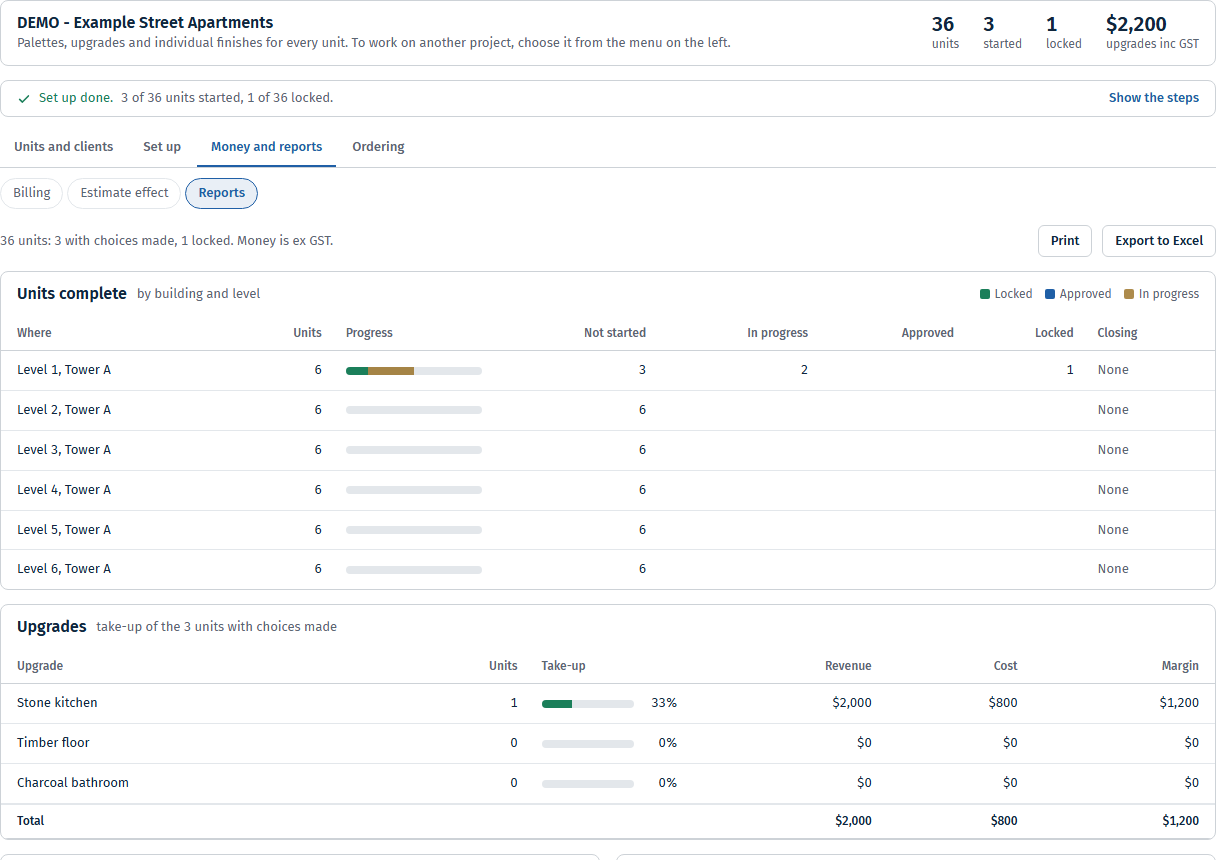
Units complete: each building and level, with its units Not started, In progress, Approved and Locked, as a bar and as numbers. The level’s closing date shows beside it, and Past closing when units are not yet approved or locked after it.
-
Upgrades: how many units have each upgrade, and its Take-up among the units with any choice made. With “See cost and margin”, also Revenue ex GST, Cost and Margin.
-
Palettes: how many units are on each, Standard counted.
-
By unit type: each type’s units and how many have an upgrade, with revenue and margin for those who may see cost.
-
Outstanding: choose a list to chase: No client, Not started, Approved by the client, not locked, and, where purchasers pay, Locked, not fully paid.
-
Choose Print for a printable page, or Export to Excel for a workbook.
Good to know
Section titled “Good to know”- The figures are the same as on the Units screen, worked out when you open Reports.
- Money is left out of the print and the workbook for people without “See cost and margin”.
- If the print window does not open, the browser has blocked it. Allow pop-ups for the site and try again.