

Set closing dates for clients' choices
Trades need the finishes in time to order them. A closing date is the last day clients can change their choices in the portal. Set one for the project, and give a building or level its own where it is built earlier or later.
Before you start
Section titled “Before you start”- You need the “Set up the finishes catalogue” permission to set closing dates.
- Giving the default palette needs “Make selections for units”.
Set the dates
Section titled “Set the dates”-
Open Finishes Schedule, choose Units and clients, then Units.
-
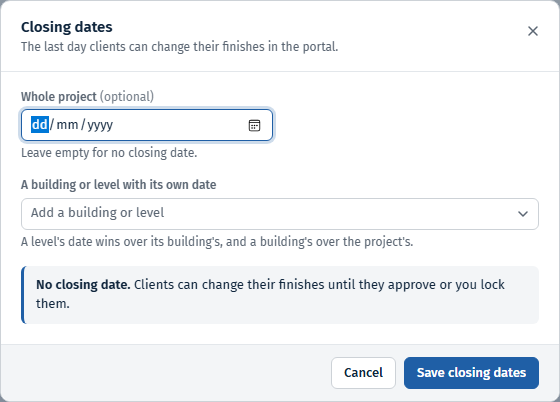
Choose Closing dates.
-
Type the date for the Whole project, or leave it empty for none.
-
Under A building or level with its own date, choose Add a building or level, pick it, and type its date. The bin removes one.
-
Read the box at the bottom: it lists each date and how many units it applies to.
-
Choose Save closing dates.
Give the default palette to units with nothing chosen
Section titled “Give the default palette to units with nothing chosen”When clients have not chosen by their closing date, you can give their units one palette in a single step.
- Mark one palette Give this palette at closing to units with nothing chosen: open it under Set up, Palettes, and switch this on at the bottom of the form.
- On the Units screen, choose Give default palette. It shows only when a unit is waiting for it.
- Read the list: the units past their closing date with nothing at all chosen, and the date each closed. Units where the palette is not offered are named and left out.
- Choose the button, which reads Set Light on 6 units.
What happens next
Section titled “What happens next”- After its closing date, the client sees their choices but cannot change them. Before it, the portal says “Please choose by” the date.
- Units past their date that are not approved or locked show Past closing on the Units screen and in Reports.
- Units given the default palette stay open. You or the client can still change them, and you lock them as usual.
Good to know
Section titled “Good to know”- Closing dates bind the client only. You can still change a unit after its date.
- A level’s date wins over its building’s, and a building’s over the project’s.
- The default palette is never given automatically: only when someone chooses Give default palette.
- Only one palette per project can be the default.