

See what the finishes do to the estimate
The estimate is priced on the Standard finishes. Every unit that chooses something else adds or takes off cost. The Estimate effect screen shows that difference by cost code, for the locked units and, beside them, for the units still open.
Before you start
Section titled “Before you start”- You need the “See cost and margin” permission. Without it the screen is not shown.
- The Estimate column also needs access to the estimate and the permission “See cost rates and totals”.
- The options have their estimate lines: see Give options their estimate lines.
-
Open Finishes Schedule, choose Money and reports, then Estimate effect.
-
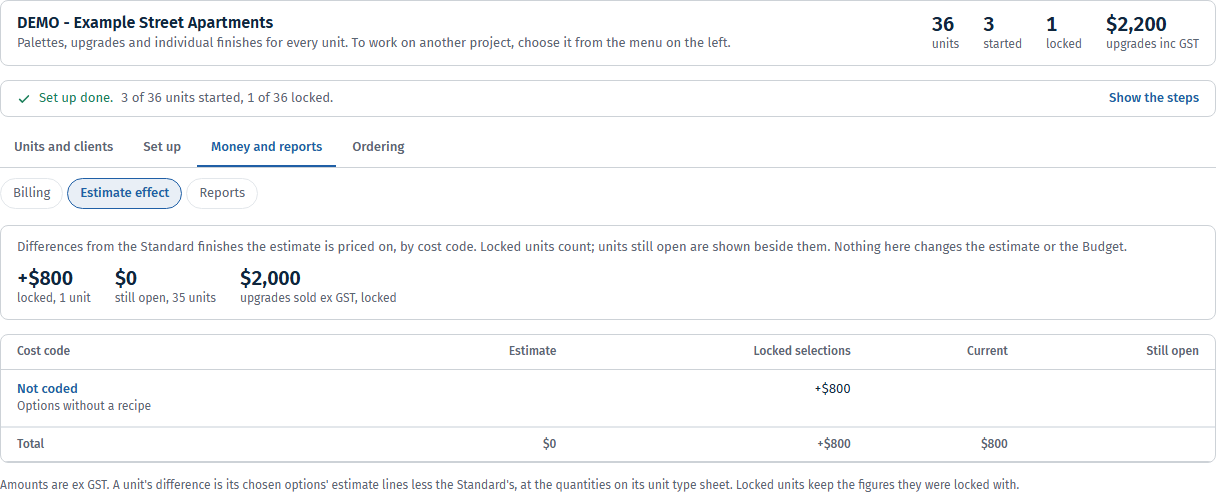
Read the totals at the top: the difference for locked units and for units still open, and the upgrades sold ex GST.
-
If the project has more than one estimate, choose which one under Estimate. The one with the signed contract is chosen first, else the latest.
-
Read the table. For each cost code: Estimate (what the estimate holds), Locked selections, Current (the estimate plus the locked selections) and Still open.
-
Choose a cost code to see the units in it, each marked Locked or Open.
Show locked selections in the Budget
Section titled “Show locked selections in the Budget”To have the Budget follow the locked choices, switch it on for the project:
- Choose Ordering, then What to buy, then Ordering settings. This needs “Order from the finishes schedule”.
- Switch on Show locked selections in the Budget and choose Save.
Each cost code in the Budget then gets a Finishes selections figure, and what is allowed includes it.
Good to know
Section titled “Good to know”- Nothing here changes the estimate. The estimate stays priced on the Standard finishes; the Budget figure is separate.
- Locked units keep the figures they were locked with. A later change to a recipe moves only the units still open. Units locked before recipes were kept are worked out from today’s recipes, and the screen says so.
- “Not coded” holds options with no recipe.
- Items with nothing chosen on open units are not in the figures; a note says how many.
- Amounts are ex GST.