

Subcontractor Claims
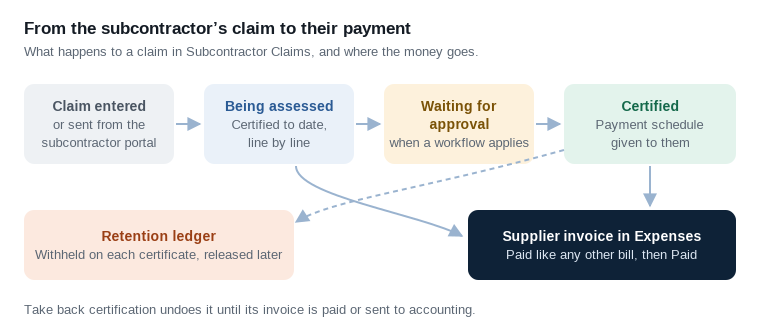
Each month a subcontractor claims for the work done. Here the claim is entered against their subcontract, assessed line by line, and certified. Certifying holds back retention, makes the supplier invoice for the amount to pay, and lets you print the payment schedule. Retention held is kept in a ledger for each subcontract and released at practical completion and after the defects period.
It is in the menu on the left, under Contracts, and works on the project chosen in the left-hand picker. Claims can be entered only on a subcontract that has been signed (Executed) or is Complete.
The words used
Section titled “The words used”| Word | Meaning |
|---|---|
| Claimed to date | What the subcontractor says is done on a line, in total so far |
| Certified to date | What you agree is done on a line, in total so far |
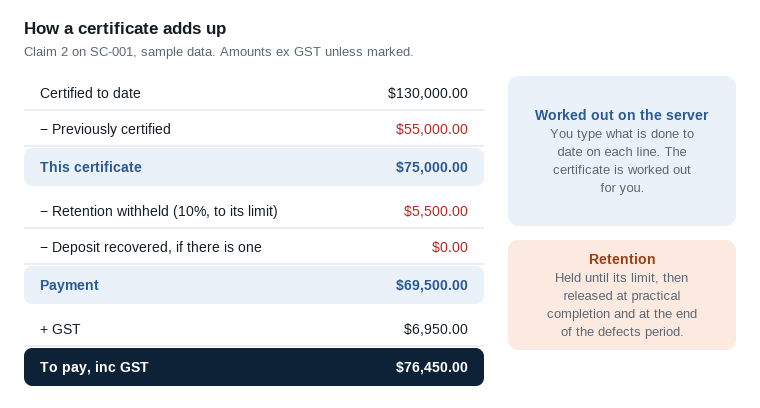
| This certificate | Certified to date less what was certified before |
| Retention withheld | The share of this certificate held back, at the subcontract’s rate until its limit is reached |
| Payment | This certificate less retention withheld, and less any deposit recovered, ex GST |
| Payment schedule | Your written answer to the claim: what will be paid, why it is less than claimed, and when |
| Opening balance | What had been certified and held before the subcontract came into SmarteBuild |
| Other amount claimed | Something claimed that is not on the schedule. It counts in what was claimed, never in what is certified |
The screen
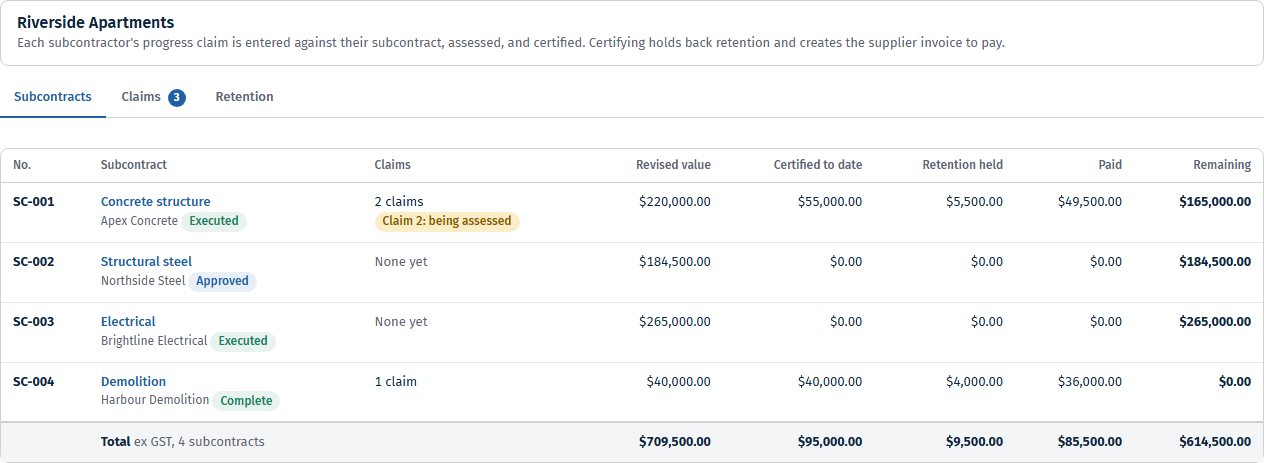
Section titled “The screen”Three tabs: Subcontracts (every subcontract that is approved or later, with its revised value, certified to date, retention held, paid and remaining), Claims (every claim on the project) and Retention (held by subcontract, on This project or All projects).
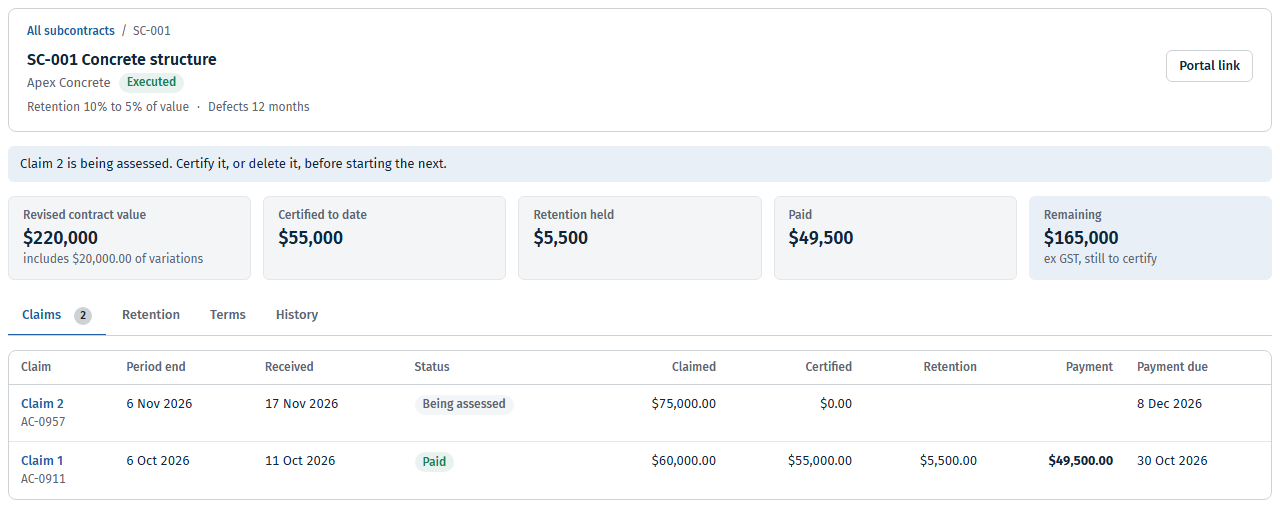
Click a subcontract to open it. Its figures are across the top, then the tabs Claims, Retention, Deposit (only when the subcontract has one), Terms and History. Click a claim to open it.
The stages of a claim
Section titled “The stages of a claim”| Stage | What it means |
|---|---|
| Being assessed | Entered. What is claimed and certified can still be changed |
| Waiting for approval | Sent through the Subcontractor claims approval workflow |
| Certified | Retention held and the invoice made. Nothing on it can be changed |
| Paid | Its invoice has been marked paid in Expenses |
Who can do what
Section titled “Who can do what”| Permission | Allows |
|---|---|
| See subcontract values | See any money here. Entering and assessing need it too, because everything on a claim is money |
| Enter subcontractor claims | Start a claim, enter what is claimed, delete a claim being assessed |
| Assess and certify claims | Assess, send for approval, certify where no workflow applies, take a certification back, record a deposit |
| Issue payment schedules | Set a subcontract’s claim terms, record a payment schedule as given |
| Release retention | Release retention, deal with retention on a terminated subcontract, enter an opening balance. Nobody but an administrator has it until it is ticked under Users |
Articles
Section titled “Articles”- Set the claim terms
- Enter an opening balance
- Enter a claim
- Assess a claim
- Certify a claim
- Give the payment schedule
- Take back a certification
- Record a deposit
- Release retention
- Deal with retention on a terminated subcontract
Where it is used
Section titled “Where it is used”Subcontracts gives the schedule, the retention terms and the deposit. Approvals decide claims, deposits and retention releases. The invoice a certificate makes is paid in Expenses, with payment approval where it applies. The Retention Register and the Cost Forecast read what is certified and held here. Subcontractors can send their claims through the Subcontractor Portal.