

Dashboard
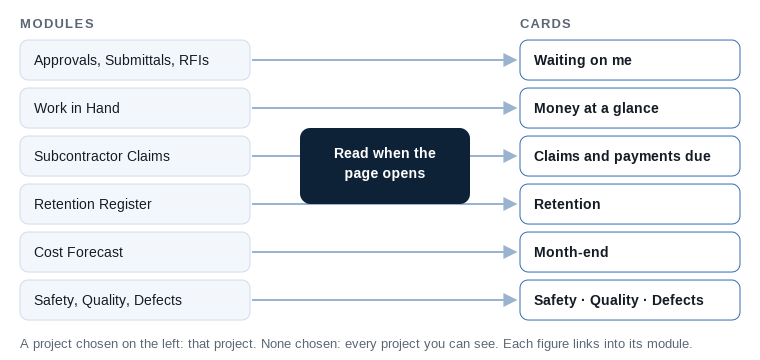
The Dashboard is the first page after you sign in. It says what is waiting on you and how the jobs are going, on cards you choose yourself. Nothing is typed into it and nothing is kept on it: every figure is read, when the page opens, from the module that owns it.
One project or every project
Section titled “One project or every project”The cards follow the project chosen on the left. With a project chosen, a card shows that project. With none chosen, it covers every project you can see, and a figure names the project that holds the oldest item. The line under each card’s title says which: “This project” or “Every project you can see”.
What you start with
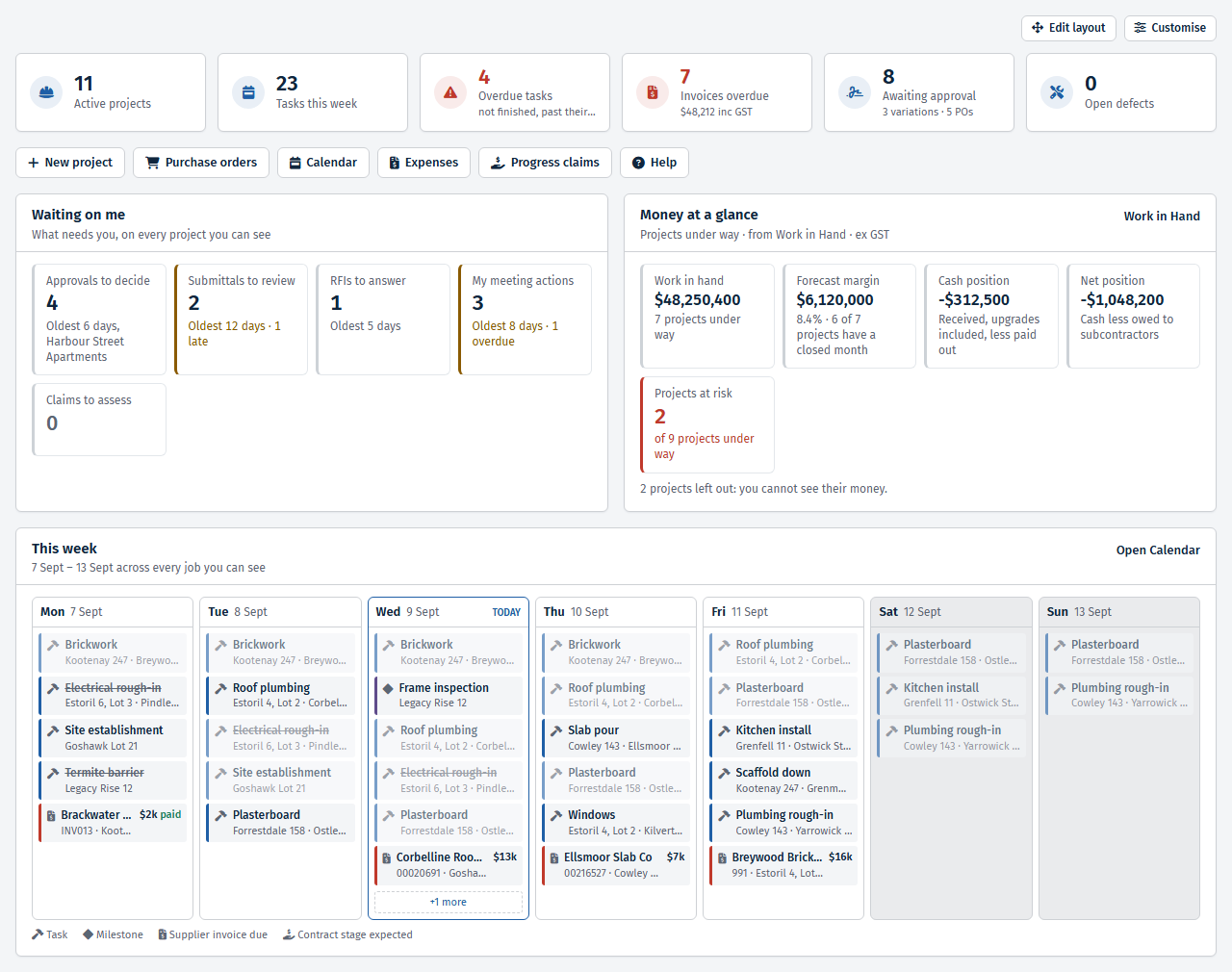
Section titled “What you start with”The page starts with six cards: Key figures, Quick actions, Waiting on me, Money at a glance, This week and Recently opened projects. Under the cards a line says how many more cards are available and switched off, with Choose what to show, which opens Customise.
The Commercial cards
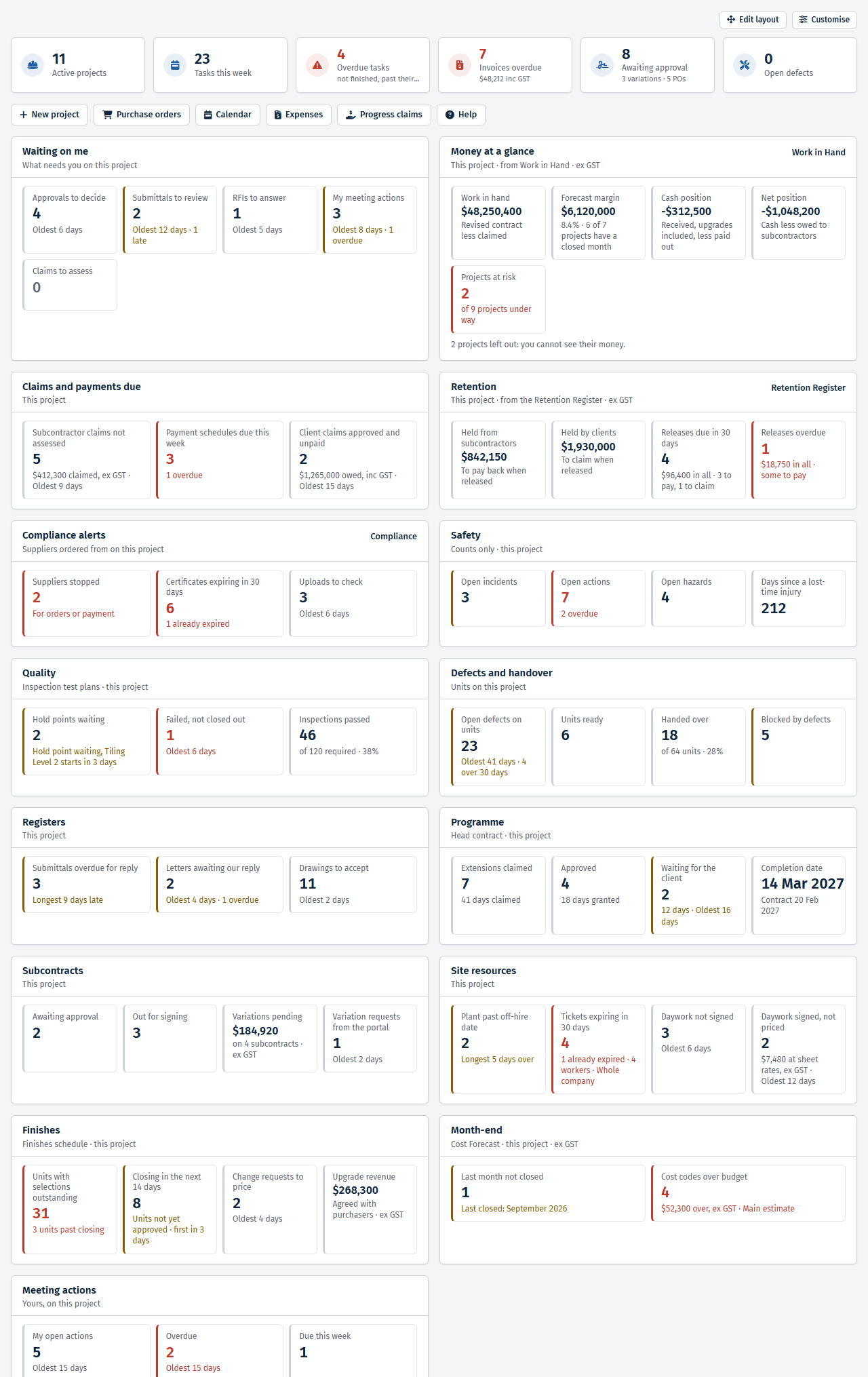
Section titled “The Commercial cards”Each is a row of figures. Under each figure a short line says more: the age of the oldest, how many are overdue, or what the money is. Every figure is a link into its module.
| Card | What it counts |
|---|---|
| Waiting on me | Approvals to decide, submittals to review, RFIs to answer, your meeting actions, subcontractor claims to assess |
| Money at a glance | Work in hand, forecast margin, cash position, net position and projects at risk, from Work in Hand, ex GST |
| Claims and payments due | Subcontractor claims not assessed, payment schedules due this week, client claims approved and unpaid (inc GST) |
| Retention | Held from subcontractors, held by clients, releases due in 30 days, releases overdue, from the Retention Register |
| Compliance alerts | Suppliers stopped, certificates expiring in 30 days, uploads from the portal to check |
| Safety | Open incidents, open actions, open hazards, days since a lost-time injury. Counts only |
| Quality | Hold points waiting, failed inspections not closed out, inspections passed of those required |
| Defects and handover | Open defects on units, units ready, handed over, blocked by defects |
| Registers | Submittals overdue for reply, letters awaiting our reply, drawings to accept |
| Programme | Extensions of time claimed, approved and waiting for the client; the completion date with one project chosen |
| Subcontracts | Awaiting approval, out for signing, variations pending, variation requests from the portal |
| Site resources | Plant past its off-hire date, workers’ tickets expiring in 30 days (whole company), daywork not signed or not priced |
| Finishes | Units with selections outstanding, closing in the next 14 days, change requests to price, upgrade revenue |
| Month-end | Projects whose last month is not closed in Cost Forecast; cost codes over budget (one project chosen) |
| Meeting actions | Your open actions, overdue, due this week |
The other cards you can switch on are Latest messages, My procurement, Development, My RFIs, Extra to Schedule, Next claim dates, Client selections, Cash forecast and Claimed vs contract.
Who sees which card
Section titled “Who sees which card”- A card is shown only to someone who has its module. A card you cannot have is not drawn and is not listed in Customise.
- Money is shown only with the module’s own permission on the project, for example “See forecasts and margin” for Cost Forecast figures and “See subcontract values” for subcontract figures. Money you may not see is left out, and the card says how many projects were left out.
- Money at a glance needs “See company work in hand”, as the Work in Hand page does.
- Retention needs “See the retention register” and “See subcontract values” on the project.
- Days since a lost-time injury needs “See incident details”.
The red safety strip
Section titled “The red safety strip”When a safety incident has something outstanding with a clock on it (the regulator not yet recorded as told about a notifiable incident, a hurt worker not yet reported to the workers’ comp insurer, or an area still held), a red strip shows above the cards for the people who are told about the incident. Each row opens the incident. It is not a card: it cannot be switched off or moved, and it goes once the duty is recorded.
A company with no projects yet
Section titled “A company with no projects yet”Until there is a project you can see with an estimate, the Dashboard shows a short panel instead of the cards. In a company with no projects at all it offers Create your first project to someone allowed to create projects, and Create a demo project to a company administrator. See Try it on a demo project.