

See a day's safety in the Site Diary
An incident or a hazard is recorded once, in Safety. The Site Diary shows what Safety holds for its day, and each incident and observation leads back to that day’s diary, so nothing has to be typed twice.
Before you start
Section titled “Before you start”- Who can do this: anyone with the Safety module and access to the project. The link to the diary needs the Site Diary module too.
-
Open Site Diary for the project and choose the day.
-
Under Issues, read the line Safety today, or Safety that day for another day. It counts that day’s incidents and observations, open or closed, with one short line for each, for example “INC-004 · Injury · High · Tower A, Level 3”.
-
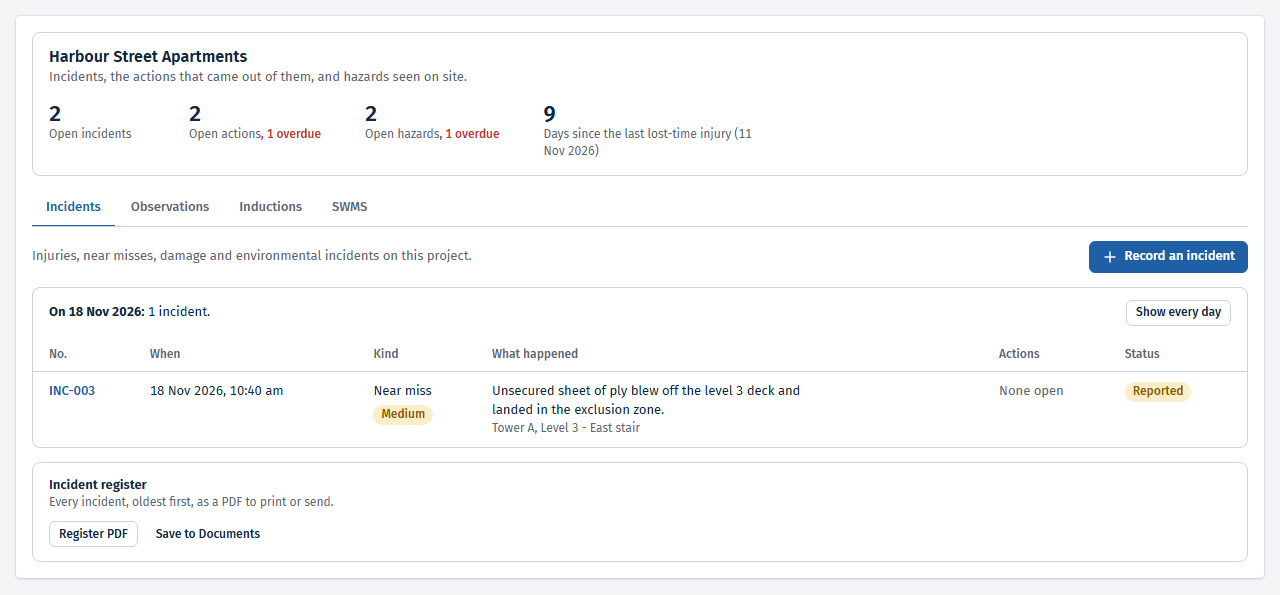
Press See them in Safety. Safety opens on that day only, with a line such as “On 17 Nov 2026: 1 incident.” Closed ones are listed too.
-
Click a row to open the incident or observation.
-
Press Show every day to see the whole register again.
To go the other way, open an incident or an observation in Safety and press Site Diary for that day beside its date. The diary opens on that day.
Good to know
Section titled “Good to know”- The diary only reads Safety. Its own boxes for safety hazards and follow-up are not filled in from it, and stay as you type them.
- An incident counts on the day it happened, an observation on the day it was seen.
- The diary never shows the names of the people involved. Someone without “See incident details” sees another person’s incident as its number and how serious it was, as on the register.
- On a day with nothing in Safety the line says so, with Open Safety.
- Someone without the Safety module sees no Safety line in the diary.
- If the day has observations and no incident, Safety opens on the Observations tab.