

Record a deposit
When a subcontract has a deposit, record it here when you pay it. Its invoice is made, and each later certificate takes part of it back until it is all recovered.
Before you start
Section titled “Before you start”- You need the “Assess and certify claims” permission.
- The deposit amount and the share recovered from each claim are set on the subcontract in Subcontracts, and the subcontract is signed.
-
Open the subcontract and the Deposit tab.
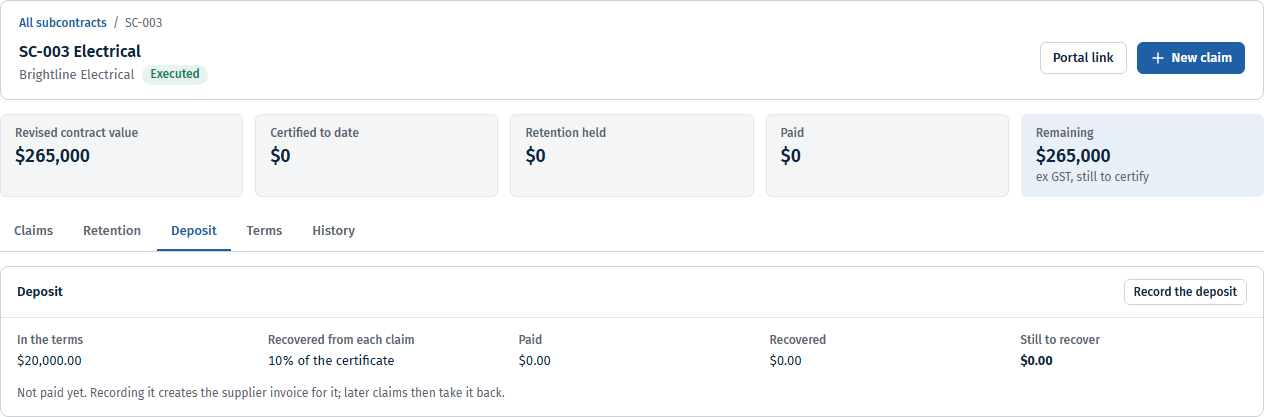
-
Choose Record the deposit, or Send the deposit for approval when a step of the Subcontractor claims workflow applies to its amount.
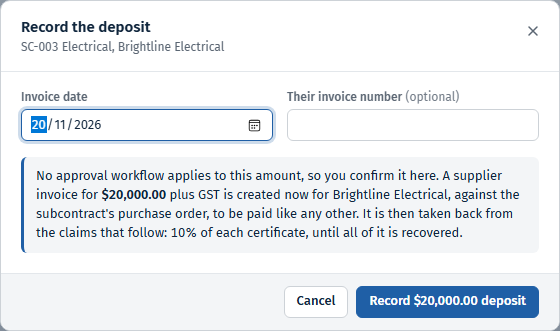
-
Choose the Invoice date and, if they gave one, type Their invoice number.
-
Confirm with the button that names the amount.
What happens next
Section titled “What happens next”- With no workflow, a supplier invoice for the deposit is made against the purchase order, to be paid like any other.
- With a workflow, it waits for approval in My Approvals and the invoice is made when it is approved. If it is not approved, it stays in the deposit ledger with the reason and can be sent again.
- Each certificate then recovers the smaller of what is left and the recovery share of that certificate. Retention is worked out on the work certified, before the deposit is taken off.
Good to know
Section titled “Good to know”- Take it back is offered until any of the deposit has been recovered or its invoice is paid, approved for payment or sent to accounting.
- A subcontract completed or terminated with deposit still to recover says so. Nothing is taken from retention to cover it.