

Start a month
Each month’s forecast is kept on its own, so it can be closed and compared with the next. Start the month before you work through the costs to complete. Until a month is started the figures are live and nothing you see is kept.
Before you start
Section titled “Before you start”- Who can do this: Edit cost to complete. Administrators always can.
- The project has an estimate with cost codes.
- No other month is open on this estimate. Close or discard it first.
-
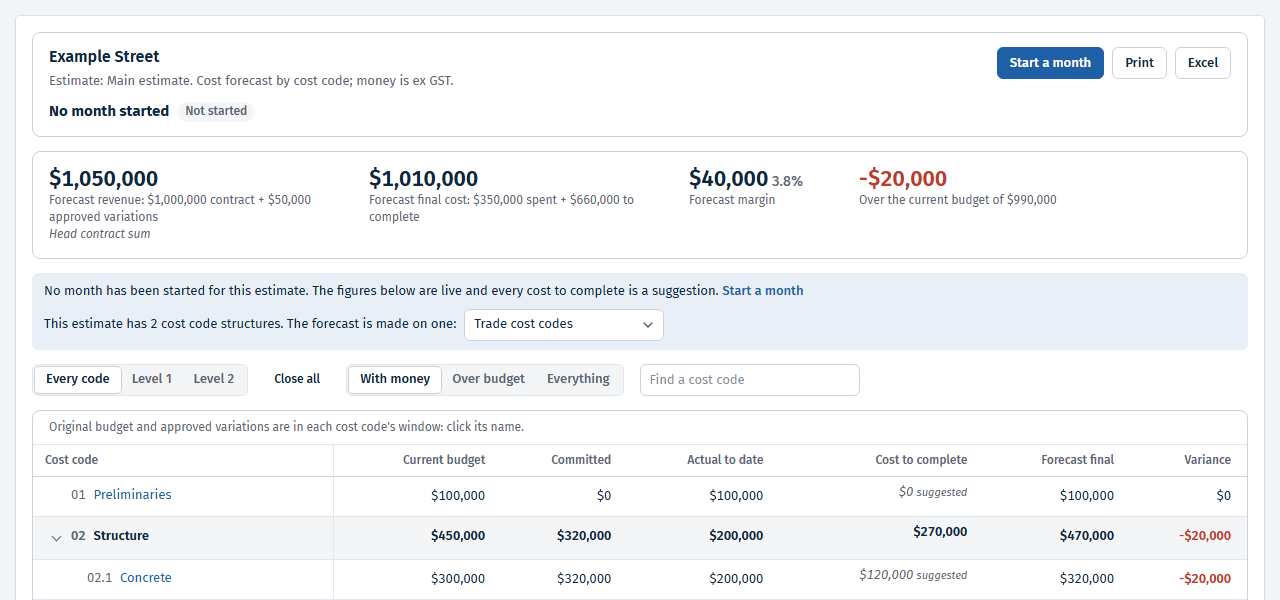
Open Cost Forecast, choose the project on the left and the estimate at the top.
-
If the estimate has more than one cost code structure, a line says so. Choose the structure the forecast is made on from the list beside it.
-
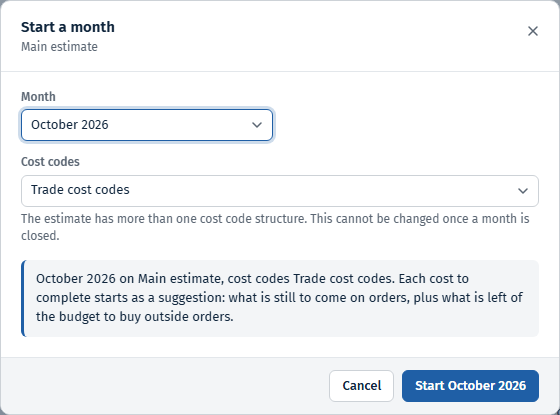
Choose Start a month. A window opens.
-
Choose the Month. It is the current month unless the month after the last closed one is earlier.
-
Read the sentence at the foot of the window: it says which estimate the month is on and where each cost to complete will start.
-
Choose Start and the month’s name. The page shows the month with Open beside it.
What happens next
Section titled “What happens next”In the first month every cost to complete starts as a suggestion. In later months each cost code keeps the last closed month’s forecast final cost, marked carried, so its cost to complete goes down by itself as costs arrive.
Good to know
Section titled “Good to know”- The cost code structure cannot be changed once a month has been closed, because two structures can hold the same item and adding them would count it twice.
- You can start any month after the last closed one, up to the current month.
- A month that has never been closed can be thrown away with Discard this month. Everything typed in it, and its notes, go with it. This cannot be undone.