

Give options their estimate lines
The estimate is priced on the Standard finishes. To see what the chosen finishes do to the estimate, and to order them, each option needs its recipe: the estimate lines it stands for, with their cost codes, quantities, rates and suppliers. A stone benchtop might be the stone itself plus its installation.
Before you start
Section titled “Before you start”- You need “Set up the finishes catalogue” and “See cost and margin”. People with “See cost and margin” only can read the recipes.
- The project has an estimate with its cost codes.
-
Open Finishes Schedule, choose Set up, then Items and options.
-
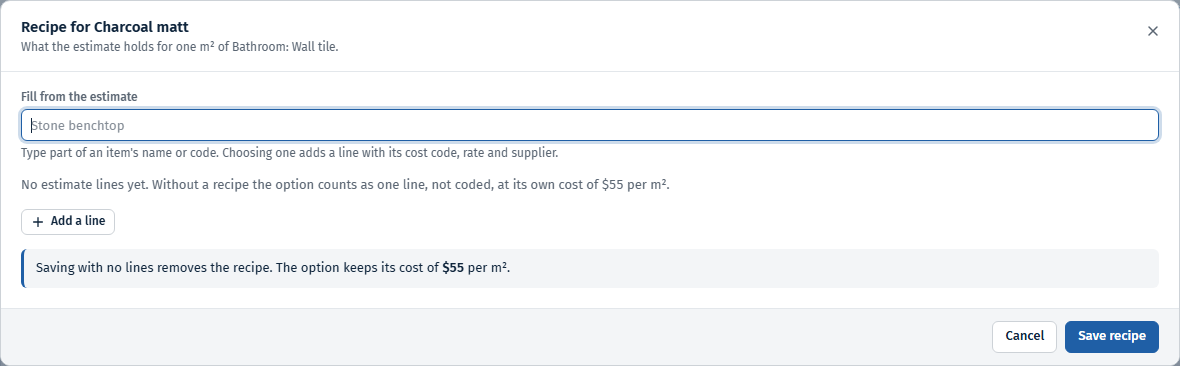
Under the option, choose Add its estimate lines. If it already has lines, the link describes them, such as “2 estimate lines: 05 Joinery, 06 Install”.
-
To copy a line from the estimate, type part of an item’s name or code in Fill from the estimate and choose it. A line is added with its cost code, rate and supplier, and stays linked to that estimate item.
-
To add a line by hand, choose Add a line and fill in its Cost code (from the estimate’s cost codes), Description, Quantity per, Measured in if it differs from the item, Rate ex GST and Supplier.
-
Quantity per is how much of this line one unit of the item needs: 1 for the product itself, 1.1 with 10% waste, 0.25 for a quarter of a kilo of adhesive per m².
-
Read the box at the bottom: “The option’s cost becomes” the total.
-
Choose Save recipe.
What happens next
Section titled “What happens next”- The option’s cost rate becomes the recipe’s total, so the extra cost on the Units screen and the estimate effect are the same figure.
- Estimate effect shows the differences by cost code.
- What to buy lists each recipe line under its supplier, at full quantity.
Good to know
Section titled “Good to know”- Only lines with a supplier and linked to an estimate item can be ordered. Others are listed as not ordered because of their recipe. Fill such a line from the estimate.
- An option with no recipe counts as one line, “Not coded”, at its own cost rate.
- Saving with no lines removes the recipe. The option keeps the cost it had.
- Recipes are not copied when the items and options are copied from another project.