

Reopen a closed month
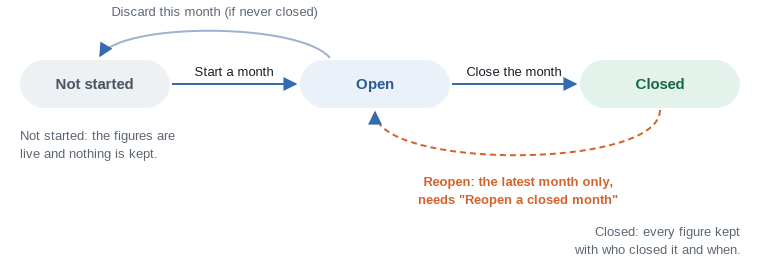
Reopen a month only when it was closed with a figure that was plainly wrong. Its figures go back to live ones until it is closed again, so the month’s report changes.
Before you start
Section titled “Before you start”- Who can do this: Reopen a closed month. Nobody but an administrator has it until it is given on the Users page.
- No later month has been started on the estimate. Months are reopened newest first.
-
Open Cost Forecast on the project and estimate.
-
Choose the closed month from the Month list.
-
Choose Reopen. A window says what will happen.
-
Choose Reopen and the month’s name. The month shows Open, reopened by you and the date.
-
Correct the costs to complete, then close the month again.
Good to know
Section titled “Good to know”- Who closed the month, who reopened it and when are all kept.
- Closing it again stores the figures afresh, as they are on that day.
- Reopen shows only on the estimate’s latest month. To reopen an earlier one, deal with the later months first, newest first.
- A month that has been reopened cannot be discarded; close it again instead.