

See what is coming due
Retention is released in two stages: a share at practical completion, and the rest when the defects period ends. Check the releases coming due so a subcontractor is paid on time and nothing the client holds is forgotten.
Before you start
Section titled “Before you start”- You need the “See the retention register” and “See subcontract values” permissions. Only projects where you have both are listed.
-
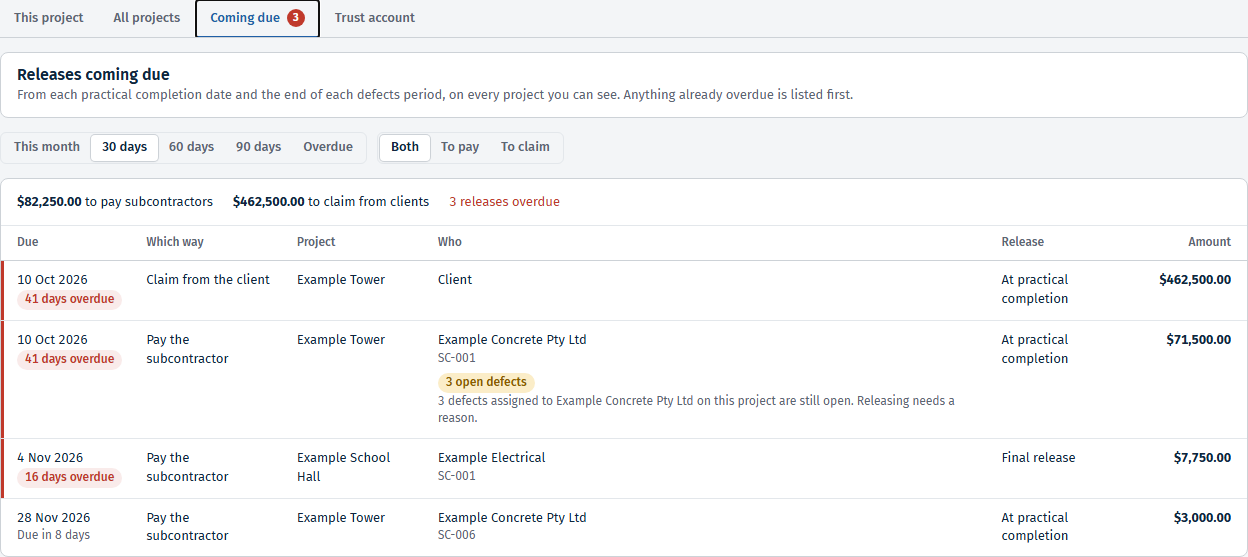
Open Retention Register and the Coming due tab. A number beside the tab says how many releases are overdue.
-
Under When, choose the period: overdue only, this month, or the next 30, 60 or 90 days.
-
Under Which way, choose Both, To pay (releases to subcontractors) or To claim (releases from the client).
-
Each row shows the date due, how long until or since, Pay the subcontractor or Claim from the client, the project, who, the release and the amount.
What happens next
Section titled “What happens next”To pay a release, choose Release retention on the subcontract’s row. It opens the subcontract in Subcontractor Claims, where the release is made with its own rules and approval. To claim back from the client, open the head contract claim from Held by the client.
Good to know
Section titled “Good to know”- Every period also lists what is already overdue, at the top.
- A release is shown only when it can be made today. Otherwise the row’s next release says when it falls due.
- A subcontract with no practical completion date shows its release with no date, and is not listed here until the date is recorded.
- A subcontractor with open defects on the project shows how many beside the release, before you release it.
- Terminated subcontracts are never listed here: their retention is released or kept by a decision in Subcontractor Claims.