

Invoice clients for their upgrades
When purchasers pay you for their own upgrades, Billing works out what each unit owes: a deposit when the client approves, and the balance at the milestone you choose. You raise the invoices, email them with their PDF, and see what is paid and owing unit by unit.
Before you start
Section titled “Before you start”- Raising, emailing and voiding invoices needs “Raise upgrade invoices”. Nobody has it until an administrator ticks it for them; administrators always can.
- The billing settings need “Set up the finishes catalogue”.
- Each unit to invoice has a client and an agreed price: approved by its client, or locked.
Say who pays
Section titled “Say who pays”Nothing is billed on a project until this is set.
-
Open Finishes Schedule, choose Money and reports, then Billing.
-
Beside Who pays for upgrades, choose Change.
-
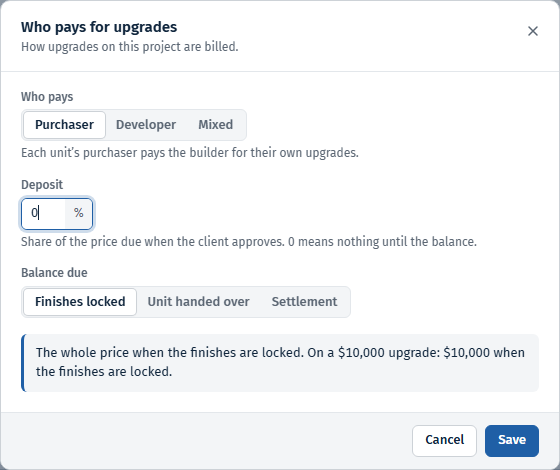
Choose Purchaser, Developer or Mixed. On a mixed project the purchaser pays unless you set a unit to the developer.
-
For the purchaser, type the Deposit percent (0 means nothing until the balance) and choose when the Balance due is: Finishes locked, Unit handed over or Settlement.
-
Read the example underneath: “On a $10,000 upgrade: $1,000 on approval and $9,000 when the finishes are locked.”
-
Choose Save.
On a mixed project, tick units and choose Who pays to set them to the developer or back to the purchaser. That needs “Make selections for units”.
Raise invoices
Section titled “Raise invoices”-
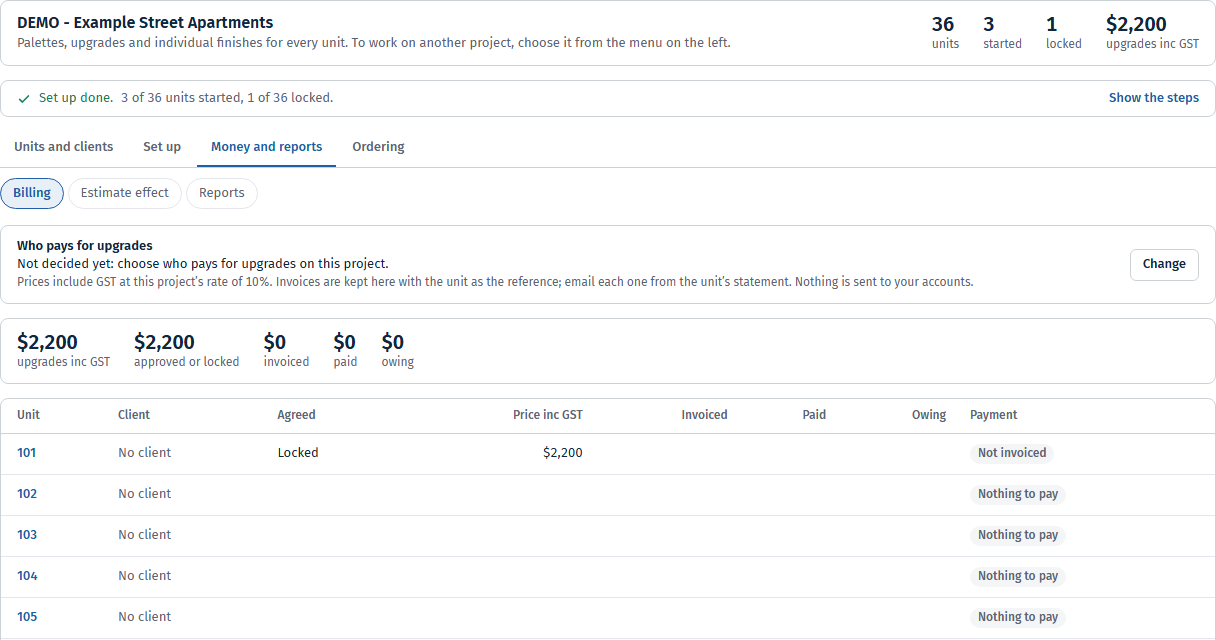
On Billing, the To invoice now column says what each unit owes now: “Deposit $753”, the balance, or a credit note.
-
Tick the units and choose Raise invoices. To invoice one unit, open its statement and choose Raise deposit (or balance).
-
Read the list: each unit’s invoice and amount, and why the others have nothing due.
-
If the balance is due at settlement, tick Settlement has happened for these units, so their balance is due.
-
Check the Invoice date and Due in days.
-
Choose the button, which reads Raise 3 invoices.
Email an invoice
Section titled “Email an invoice”- Choose the unit to open its statement.
- Beside the invoice, choose Email.
- Check To (the client’s email, up to five addresses), and add a Note if you want. The form shows the subject, the message and the attached PDF before anything goes, and warns if your company has no ABN or bank account entered.
- Choose Send invoice. The statement then shows when it was emailed.
PDF beside an invoice opens the tax invoice.
What happens next
Section titled “What happens next”- The client sees their price with its GST, Your invoices and what is left to pay on Your finishes in their portal, and can open each invoice. They never see void invoices or your cost.
- The first invoice on an agreed price records the unit’s upgrade agreement. If the agreed price changes later, the statement says the agreement is out of date and the next invoice records a new one.
Good to know
Section titled “Good to know”- An invoice is never edited. Void it with a reason (it stays on the record and its number is not used again), or let a credit note correct it. A credit note is raised when more was invoiced than the agreed price.
- Invoices are numbered per project (UI-001, UI-002), and two people cannot invoice the same unit twice at once.
- Prices include GST at the project’s rate.
- When the developer pays, units show “Developer pays” and nothing is invoiced from here. Bill the developer through the head contract.
- Upgrade invoices are not sent to your accounting system.