

Deal with retention on a terminated subcontract
When a subcontract has been terminated with retention still held, you decide what happens to it: pay it to the subcontractor, or keep it. Either way you give a reason. The product has no rule about which is right; that is for you and your contract.
Before you start
Section titled “Before you start”- You need the “Release retention” permission.
-
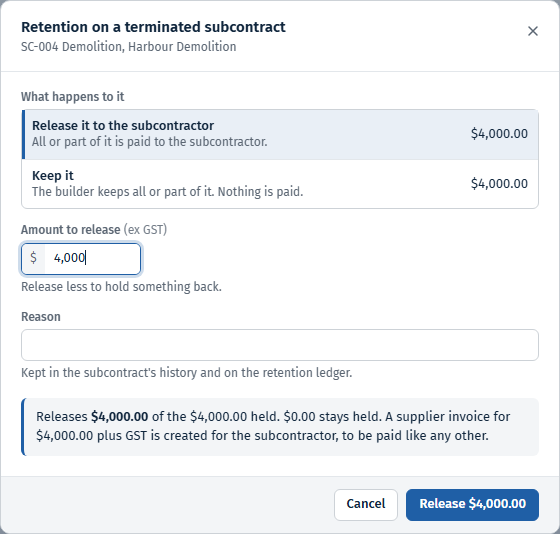
Open the terminated subcontract and the Retention tab. Choose Release or keep retention.
-
Under What happens to it, choose Release it to the subcontractor or Keep it.
-
Type the amount in Amount to release or Amount to keep. It can be less than all that is held.
-
Type the Reason.
-
Choose Release or Keep; the button names the amount.
What happens next
Section titled “What happens next”- Released: a supplier invoice for the amount is made, as for any release.
- Kept: the amount stops being held and is never paid. No invoice is made, now or later.
- Either goes through the Retention release approval workflow where a step applies to the amount. The ledger shows it as released after termination or kept by the builder, with the reason.
Good to know
Section titled “Good to know”- Part can be kept and the rest released, in any order, until nothing is held.
- The ordinary releases, at practical completion and final, are not offered on a terminated subcontract.