

Add a SWMS and review it
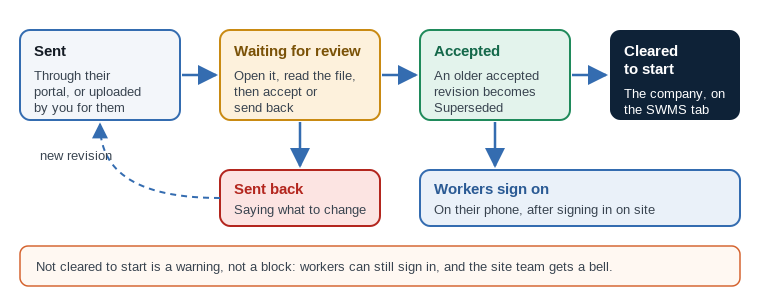
A subcontractor sends its SWMS through its portal, or you add it for them. Each one waits for review: accept it, or send it back saying what needs to change. A company is cleared to start once it has an accepted SWMS on the project.
Before you start
Section titled “Before you start”- Adding a SWMS needs “Add SWMS”. Accepting and sending back need “Review SWMS”. Nobody has either until an administrator ticks it; administrators always can.
- The SWMS register is switched on. See Set up the SWMS register.
-
Open Safety, choose the project on the left, then the SWMS tab. The line at the top says how many companies are not cleared to start and how many SWMS are waiting for review.
-
To add one, press Add a SWMS, or SWMS on the company’s card. Choose Whose SWMS (a company, or Our own), type the Work covered, for example Formwork, choose The file and press Add the SWMS. It is listed with its number, for example SWMS-001, waiting for review.
-
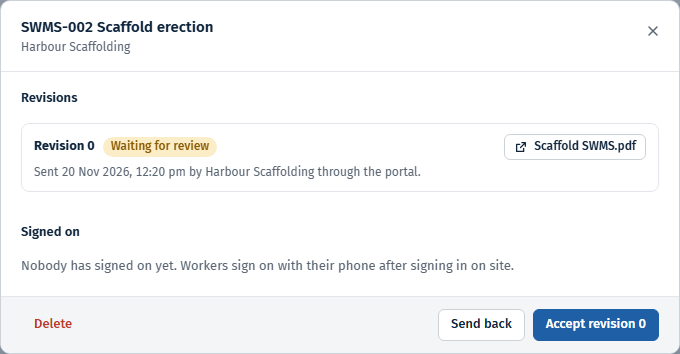
To review one, press Open on its line. The window lists its revisions; press the file’s name to read it.
-
Press Accept revision 0. The revision shows Accepted with your name, and the company shows Cleared to start.
-
Or press Send back, type What needs to change, and press Send back revision 0. The subcontractor reads your words in their portal and sends a new revision.
What happens next
Section titled “What happens next”- The subcontractor is emailed when its SWMS is accepted or sent back. The email carries no file and no link.
- The company’s workers see the accepted SWMS on their phone after signing in on site, and sign on to it. Signed on, in the SWMS’s window, lists who signed and which revision.
Good to know
Section titled “Good to know”- A changed SWMS is a new revision. Press Upload a new revision, or the subcontractor sends one. The accepted one stays in force until the new one is accepted; it is then marked superseded, and workers are asked to sign on again.
- Only one revision is ever accepted. Each revision is reviewed once.
- A SWMS not yet accepted can be opened only by a reviewer, someone who adds SWMS, or the person who sent it.
- Delete removes a SWMS that was never accepted, and its file; its number is not used again. An accepted one is kept as a record.
- Our own SWMS are for your own people. Everyone signed in on site can read them.
- Due for review shows on an accepted SWMS older than the months in the settings. It stays accepted, and the company stays cleared.
- When a SWMS or a new revision is sent, the project’s reviewers get a bell.
- SmarteBuild records that a named person accepted a SWMS. It never says a SWMS is compliant.